Roaste: A Keynote Template for Modern, High-Impact Presentations
That moment of opening a blank presentation file can be paralyzing. Whether you're a startup founder preparing for a pitch, a marketing manager outlining a new campaign, or a creative professional showcasing a portfolio, the pressure to make it look polished and professional is immense. The challenge isn't just having great content; it's presenting that content in a way that captures attention, communicates clarity, and builds credibility. This is where a thoughtfully designed template like Roaste becomes less of a luxury and more of a strategic tool for anyone who needs to communicate ideas visually.
Designed for Clarity and Impact
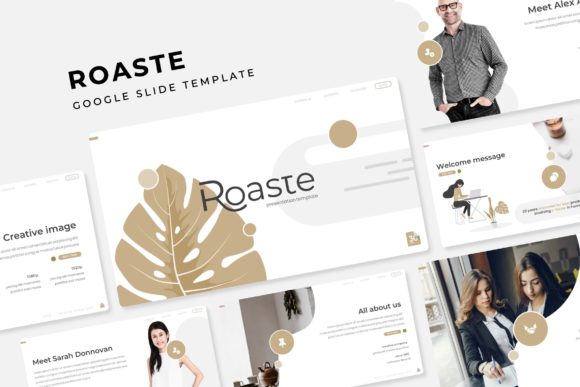
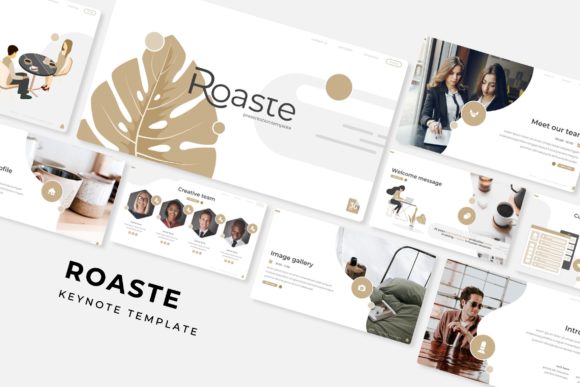
The Roaste Keynote Template is built around a core philosophy of clean, modern aesthetics. It avoids clutter and distracting elements, instead focusing on structured layouts that guide the viewer's eye naturally through your information. The visual appeal comes from a harmonious balance of white space, carefully chosen typography, and a system of graphic elements that feel both professional and engaging. This isn't just about making slides look pretty; it's about creating a visual framework that makes your core message easier to understand and remember. The consistency across its 150+ total slides ensures that from the first title slide to the final thank you, your presentation feels cohesive and intentional, reinforcing your brand identity at every turn.
A key feature that sets this template apart is its system of five premade color palettes. Each color variation offers a distinct mood—from bold and energetic to calm and corporate—allowing you to quickly align the presentation's tone with your specific brand or topic. Within each of the five color themes, you get 30 meticulously crafted slides, giving you a robust library of layouts for every possible need: from data-heavy charts and timelines to image-centric gallery slides and clean section breaks. This structure eliminates the guesswork and frantic last-minute designing, freeing you to focus entirely on your narrative.
Practical Applications Beyond the Boardroom
While the immediate use case for a keynote template is a formal presentation, the assets included with Roaste offer significant value for a range of creative and commercial projects. The handcrafted infographics, for instance, are goldmines for content creators and marketers. Imagine extracting a single, beautiful process diagram or a stylish comparison chart to use in a blog post, a social media carousel, or a downloadable PDF guide. The pixel-perfect illustrations and resizable graphics, based on master slides for easy editing, become standalone design assets for your broader visual toolkit.
For small business owners and entrepreneurs, the template serves as a foundation for building a more professional brand presence. The gallery and portfolio slides are perfect not just for showing past work in a meeting, but also for creating stunning visual case studies for your website or PDF lookbooks for clients. The consistent design language can inform other materials—think of using the color palettes and graphic styles from the template to inspire the look of your next email newsletter header, a set of social media graphics, or even the visual theme for a webinar. It’s about extracting a cohesive visual identity from a single, well-designed source.
Streamlining Your Workflow and Enhancing Communication
One of the most significant time-savers in the Roaste package is its use of picture placeholders and drag-and-drop functionality. Instead of painstakingly resizing and cropping every image to fit a frame, you simply drag your photo into the designated area, and the template does the rest. This is particularly valuable for professionals who regularly update presentations with new team photos, product shots, or event imagery. The result is a consistently polished look, even when you're working under a tight deadline.
Beyond efficiency, the right visual presentation directly impacts audience engagement and comprehension. The clean layouts and structured infographics in Roaste are designed to make complex information digestible. When data is presented in a clear, visually organized way, your audience spends less time trying to decipher the slide and more time engaging with your ideas. This professionalism translates to greater credibility, whether you're pitching a new idea to investors, educating a classroom of students, or selling a service to potential clients. The template acts as a silent partner, enhancing your communication without overshadowing your message.
Getting the Most from Your Template
To truly leverage a tool like Roaste, start by exploring all five of the included PPTX files to understand the range of layouts available. Don't feel confined to using one entire color theme; you might prefer the slide structure from one variation but the color palette from another. A key advantage of the template being based on master slides is that you can often globally change the color scheme with a few clicks, giving you even more flexibility.
When customizing, always prioritize your content's readability. While the template provides beautiful typography pairings, ensure your chosen text size remains legible, especially for charts and infographics. The "Readme First" file included is a crucial resource—it often contains important details about the free fonts used and any specific licensing notes. Using the recommended fonts ensures the design's integrity, but you can also experiment with substituting a complementary premium font from your own library if you have a specific brand typeface.
Finally, think beyond the immediate presentation. The included sections—section breaks, portfolio layouts, and standalone graphic elements—are designed to be repurposed. Export a single infographic slide as an image for a social media post. Use the consistent style of the timeline slides to create a project roadmap graphic for your blog. The true value of a comprehensive template like Roaste lies not just in delivering a single great presentation, but in providing a versatile design system that elevates your entire visual communication strategy, saving you time and ensuring a professional result every time.