Roaste: A Google Slides Template for Modern, Cohesive Branding
Building a consistent and professional brand identity is no small task, especially when your visual assets are scattered across different platforms and file types. If you've ever spent hours trying to match the exact shade of your logo in a presentation or struggled to maintain a unified look across your social media graphics, website, and pitch decks, you know the frustration. A cohesive design system is the backbone of clear communication, and it starts with having the right tools. This is where a well-structured presentation template like Roaste can become a foundational asset for your entire brand ecosystem, moving beyond just slides to inform your broader visual language.
Beyond the Slide Deck: Understanding the Roaste Design System
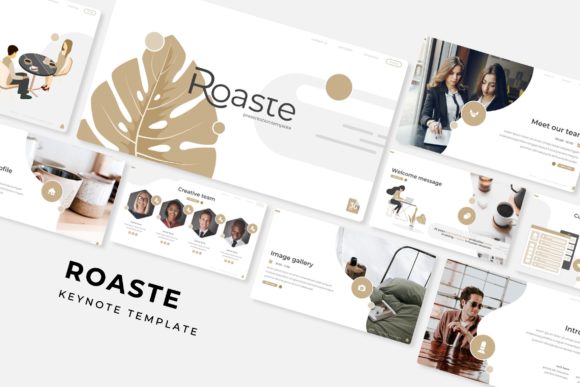
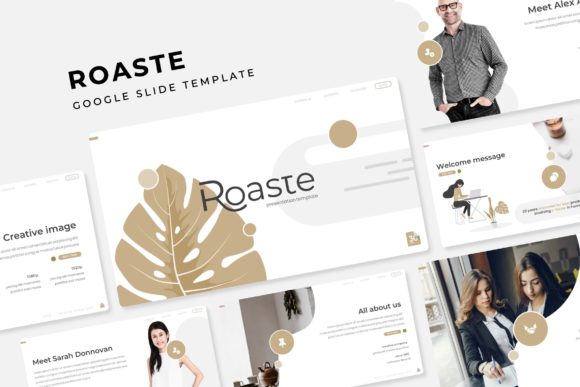
At first glance, Roaste is a Google Slides template. But its true value lies in its comprehensive design system. With over 150 total slides distributed across five premade color variations, you're not just getting a presentation; you're getting a versatile visual toolkit. Each color theme provides 30 meticulously crafted slides, ensuring you have a slide for every conceivable need—from a clean section break to a detailed infographic, a portfolio gallery, or a sleek picture placeholder. The "handcrafted infographic" slides are particularly noteworthy, offering ready-made layouts to visualize data, timelines, and processes without starting from scratch.
The design philosophy here is pixel-perfect precision combined with practical flexibility. Every illustration and graphic element is designed to scale beautifully, and the entire template is based on master slides. This master slide architecture is a game-changer for brand consistency. It means you can update a logo, change a font, or adjust a color in one central place, and that change will cascade throughout your entire 150-slide deck. It’s the kind of behind-the-scenes efficiency that saves you from the tedious, slide-by-slide edits that derail productivity.
Practical Applications for Entrepreneurs and Creatives
The real power of a resource like Roaste is its application across your entire brand touchpoints. For a small business owner, this template can serve as the single source of truth for your visual identity.
For Marketing and Sales: Imagine crafting a client proposal, a quarterly business review, or a product launch presentation that looks and feels identical to your website and social media content. The 30 slides per color variation give you ample room to build out complex narratives, and the resizable, editable graphics with drag-and-drop picture placeholders make it simple to drop in your own product shots and team photos. This level of professionalism builds immediate trust with potential investors and clients.
For Content Creators and Brand Builders: Your visual consistency is your signature. Use the gallery and portfolio slides to create stunning lookbooks or digital media kits. The section break slides can be repurposed as standalone social media graphics or blog post headers, ensuring every piece of content you publish carries your distinct brand aesthetic. The included font recommendations (with free download links) help you extend that look to your website, email newsletters, and printed materials.
For Internal Communication and Culture: A cohesive brand isn't just for external audiences. Use a customized version of Roaste for internal training decks, company all-hands meetings, or project proposals. When your internal documents match your external branding, it reinforces company culture and pride in the brand.
Maximizing Your Template: Tips for Seamless Integration
Getting the most out of a premium template requires a bit of strategy. Before you dive in, take these steps to ensure Roaste works seamlessly within your workflow.
- Establish Your Brand Kit First: Before opening the PPTX files, have your core brand assets ready: your primary and secondary logos (in PNG format with transparent backgrounds), your exact brand color hex codes, and your chosen font files. This allows you to immediately customize the master slides to reflect your identity from the top down.
- Choose Your Color Palette Strategically: The five premade colors are a fantastic starting point. Select the one that most closely aligns with your brand's primary color. From there, you can use the master slide editor to fine-tune accent colors to match your full palette. Don't feel locked into one theme; you can mix and match slides from different color files if your brand guidelines allow for it.
- Leverage the Structure for Storytelling: The slide sequence is designed with a narrative flow in mind. Use the section break slides to clearly delineate chapters in your presentation—problem, solution, market analysis, team, financials. This inherent structure helps you build a compelling story, not just a collection of facts.
- Test Across Platforms: While the files are PPTX, they open beautifully in Google Slides. However, always do a final review in the platform where you'll be presenting. Check that fonts are displaying correctly (using the recommended free fonts helps) and that animations or transitions, if any, behave as expected.
The Value of a Cohesive Visual Asset
In a crowded digital landscape, clarity and professionalism are currencies of trust. A tool like Roaste is less about having a "pretty" presentation and more about investing in a system that ensures every visual communication you send out is on-brand, clear, and impactful. It eliminates the guesswork and design debt that accumulates when you're constantly creating from zero. For the entrepreneur, it means more time focused on strategy and less on formatting. For the designer, it provides a robust, customizable framework to deliver consistent results for clients. Ultimately, it’s about presenting your ideas—and your brand—with the polish and coherence they deserve.