Mahesto Power Point Template: A Visual Toolkit for Modern Presentations
You’ve spent weeks refining your business strategy, perfecting your product pitch, or mapping out a new marketing campaign. The content is solid, the data is compelling, and the narrative is clear. Yet, the moment you open a blank presentation file, that familiar wave of creative block hits. How do you translate all that brilliant thinking into a visual story that captivates your audience, builds trust, and looks unmistakably you? The gap between a good idea and a professional presentation often lies in the design execution. This is where a thoughtfully constructed asset like the Mahesto Power Point Template moves from being a simple download to becoming a core component of your visual communication strategy.
Beyond the Default Slide: Crafting a Cohesive Brand Narrative
For entrepreneurs, marketers, and creative professionals, a presentation is rarely just a series of slides. It’s a brand touchpoint. Whether you’re pitching investors, onboarding new clients, or presenting at a conference, your slides need to reflect the same level of polish and intention as your logo or website. The challenge is achieving this without a dedicated design team or spending countless hours wrestling with alignment tools and color palettes.
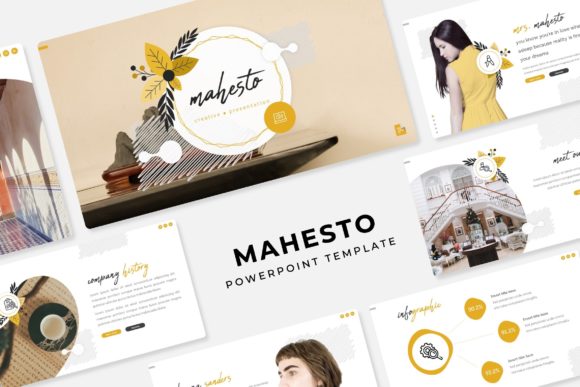
The Mahesto template addresses this directly by providing a structured yet flexible system. With 150+ total slides organized across 5 premade color themes (30 unique slides for each color variation), it offers a substantial foundation. This isn’t about having a hundred nearly identical layouts; it’s about having a curated library of content blocks—section breaks, portfolio galleries, data visualization slides, and image-heavy layouts—that you can mix, match, and adapt. The consistency comes from the underlying Master Slides. When every element is built on a master, changing a font, adjusting a color scheme, or updating a logo becomes a global edit, ensuring your entire presentation maintains visual harmony. This systematic approach is what separates a professional-looking deck from a disjointed collection of slides.
Practical Applications: From Pitch Decks to Marketing Reports
The true value of a template like Mahesto is measured in its utility across diverse projects. Its pixel-perfect illustrations and handcrafted infographics are designed for clarity, making complex data digestible. The resizable and editable graphic placeholders are a significant time-saver. Instead of cropping and resizing images in another program, you can simply drag and drop your photographs or illustrations directly onto the slide, and they conform perfectly to the designated space. This feature alone streamlines the workflow for anyone regularly creating visual content.
Consider how this translates to real-world use:
- Startup Pitch Decks: Use the clean, modern layouts to present market analysis, team bios, and financial projections with confidence. The professional aesthetic helps build credibility with potential investors.
- Marketing Campaign Reviews: Showcase social media graphics, campaign metrics, and future strategies in a visually engaging report that keeps stakeholders engaged.
- Client Onboarding & Proposals: Create a branded welcome guide or a detailed service proposal that sets a professional tone from the very first interaction.
- Educational Workshops & Webinars: Structure your teaching content with clear section breaks, informative infographics, and portfolio slides to highlight case studies or student work.
- Internal Communications: Transform quarterly updates, project plans, or training materials from dense documents into clear, visual narratives that improve comprehension and retention.
The inclusion of 5 PPTX files (widescreen format) and a Readme First guide ensures you can get started immediately. The fonts used are free to download, eliminating a common hurdle. A critical note for commercial projects: always verify the licensing for any included assets. While the template files themselves are licensed for use, the preview photographs are for illustration only and are not included. This distinction is vital for maintaining legal and ethical standards in your work.
Maximizing Your Investment: Tips for Effective Use
Owning a powerful template is the first step; using it effectively is the next. To get the most out of a resource like Mahesto, think of it as a design system, not a finished product. Start by selecting the color theme that best aligns with your existing brand palette or the mood you want to set. Then, don’t feel constrained to use slides in sequence. The modular nature of the 150+ slides means you can pull a single infographic slide from one color set and a gallery layout from another, unifying them through your master slide edits.
Pay close attention to readability. The template’s clean typography is a strong starting point, but always test your text at the size it will be displayed. Ensure there is sufficient contrast between text and background, especially for data-heavy slides. Use the section break slides not just as dividers, but as opportunities to re-engage your audience with a powerful image or a key takeaway statement. Finally, treat the picture placeholders as a guide for your content. A compelling presentation tells a story, and high-quality, relevant imagery is a crucial part of that narrative. By investing time in sourcing or creating strong visuals to fill these placeholders, you elevate the entire deck from a template to a tailored communication tool.
In the landscape of digital assets, the Mahesto Power Point Template stands out as a comprehensive solution for creating polished, professional presentations efficiently. It bridges the gap between a brilliant idea and its visual execution, providing the structure and design assets needed to communicate with clarity and style. For anyone tasked with the responsibility of presenting information—whether to clients, colleagues, or the public—it offers a reliable foundation upon which to build compelling visual stories.