Carira Keynote Template: Designing Presentations That Actually Connect
You've got the data, the strategy, the big idea. But when it's time to present, you're staring at a blank slide deck, wondering how to turn bullet points into something your audience will actually remember. We've all been there. The difference between a forgettable presentation and one that lands often comes down to the visual framework you build it on. That's where a thoughtfully designed system like the Carira Keynote Template steps in—not as a magic fix, but as a professional foundation that lets your content shine without the design headaches.
Beyond a Single File: A Visual System for Your Brand
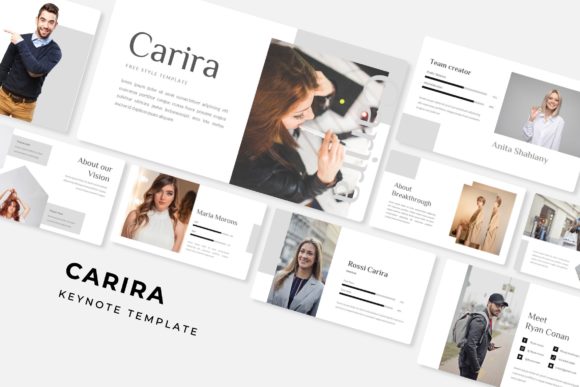
What immediately stands out about Carira isn't just a collection of pretty slides. It's a cohesive visual system. With 150+ total slides built across five premade color themes, you're not getting a one-off template; you're getting a versatile toolkit. Each of the five color variations offers 30 distinct slides, meaning you can tailor the look to different brand guidelines, project moods, or audience demographics without starting from scratch. Think of it as having five professional presentations ready to be customized, each with its own consistent palette.
This kind of structure is a game-changer for maintaining visual consistency. Whether you're a small business owner building a brand deck, a marketer preparing a campaign launch, or a freelancer pitching to new clients, using a unified template ensures every presentation reinforces your brand identity. The color themes aren't just random hues; they're curated combinations designed to evoke specific feelings—trustworthy blues, energetic greens, sophisticated neutrals. Choosing the right one becomes a strategic decision about the message you want to send before you even type a word.
Functionality That Serves Your Workflow
A beautiful template is useless if it's a nightmare to edit. This is where practical design shines. Carira is built on Master Slides, which is the backbone of any efficient presentation workflow. This means you can change a font style, adjust a color, or update a logo in one central place, and those changes cascade throughout your entire deck. No more hunting down individual text boxes or shape elements on 30 different slides. It’s a massive time-saver that also prevents the subtle inconsistencies that can make a presentation look sloppy.
The inclusion of pixel-perfect illustrations and handcrafted infographics is particularly valuable. Generic clipart can cheapen your message, but custom-designed visuals elevate it. These aren't just decorative; they're communication tools. Use a process infographic to explain a workflow, a data chart to visualize growth, or a section break slide to give your audience a visual pause. The gallery and portfolio slides are perfect for creative professionals—photographers, designers, artists—showcasing work in a clean, professional grid that doesn't distract from the projects themselves.
Practical Applications for Real-World Projects
The true test of any design asset is how it performs in the wild. The Carira template's structure lends itself to a surprising variety of uses beyond a standard corporate presentation. Its clean, modern typography and structured layouts make it a strong candidate for creating cohesive marketing assets. Imagine designing a series of social media graphics that share the exact same color story and font hierarchy as your live presentation. That visual synergy across platforms builds powerful brand recognition.
For those in e-commerce or product-based businesses, the slide layouts can be repurposed for packaging mockups or digital lookbooks. The resizable and editable graphics, along with the drag-and-drop picture placeholder functionality, make it simple to drop in product shots and create professional-looking visual guides. Educators and course creators can use the system to develop engaging lesson slides that feel polished and intentional, holding student attention far better than a chaotic, mismatched deck.
Making It Your Own: Tips for Customization
To get the most out of a template like this, think like a designer. First, don't feel bound by the premade color themes. While they're expertly designed, the true power lies in the Master Slides. Swap out the primary and secondary colors with your own brand's hex codes to instantly make the template uniquely yours. Second, pay close attention to the typography. The fonts used in the preview set the tone. If your brand voice is more playful, consider pairing the main serif or sans serif font with a complementary script or handwritten font for accent text. Always test readability on a projected screen or a mobile device; what looks elegant on your laptop might become illegible from the back of a conference room.
Finally, leverage the structure for your narrative. Use the section break slides as natural chapter markers in your story. Let the portfolio grid slides create moments of visual impact. The goal isn't to fill every slide with text, but to use the provided layout options to guide your audience's eye and pace your information effectively. A well-placed infographic can explain a complex idea more quickly and memorably than three paragraphs of text ever could.
In the end, tools like the Carira Keynote Template are about removing friction from the creative process. They provide a professional, adaptable canvas so you can focus your energy on what truly matters: crafting a compelling message and connecting with your audience. It’s a practical asset for anyone who needs to communicate ideas visually, blending aesthetic appeal with the kind of functional design that makes real-world work just a little bit easier.