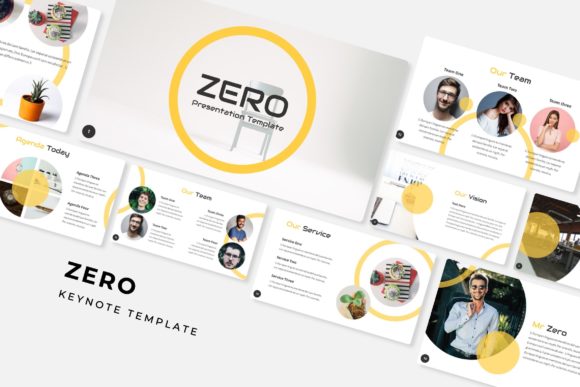
Zero Keynote Template: A Deep Dive Into Its 150+ Slide Features
There is a specific kind of dread that sets in when you open a blank presentation file. It’s the blank white canvas staring back at you, mocking your deadline. You have the data, you have the strategy, and you have the ideas, but now you have to arrange them into something that doesn't look like a high school book report. If you have ever found yourself spending three hours tweaking text boxes and aligning images only to realize you haven't even started on the actual content, the Zero Keynote Template is designed to break that cycle. It is not just a collection of slides; it is a comprehensive visual system built to handle the heavy lifting of design so you can focus on communication.
Beyond the Basics: What Makes a Premium Slide Deck?
Many templates offer a handful of layouts, forcing you to recycle the same three designs throughout a fifty-slide deck. The Zero Keynote Template takes a different approach by offering over 150 total slides. This volume is crucial for maintaining audience engagement. When you are presenting a complex business plan or a creative portfolio, visual monotony is the enemy. With this template, you have the breathing room to introduce new concepts with fresh layouts, keeping your viewers visually stimulated from the opening title to the closing call to action.
The structure is built around five premade color themes. Color theory is often an afterthought in presentation design, but it is the first thing your audience processes psychologically. Whether you are presenting to a corporate board that responds to cool blues and grays, or a creative agency that expects vibrant gradients, having thirty distinct slides dedicated to each specific color variation ensures your deck feels cohesive. You aren't just picking a background color; you are selecting a mood that aligns with your brand identity.
Visual Storytelling with Handcrafted Infographics
Data is notoriously difficult to present. A wall of numbers on a slide causes an audience to check their phones. The inclusion of handcrafted infographics in the Zero Keynote Template transforms raw data into a narrative. These aren't generic bar charts; they are custom-designed visual assets that allow you to illustrate workflows, timelines, and statistical breakdowns with clarity.
For marketers and brand strategists, this feature is invaluable. Imagine explaining a complex marketing funnel or a supply chain process. Instead of describing it verbally, you can use these pixel-perfect illustrations to show the progression. The design quality here matters. When the graphics look professional, it subconsciously signals to your audience that the data contained within them is also professional and trustworthy. It bridges the gap between "information" and "insight."
The "Drag & Drop" Efficiency for Modern Professionals
In the fast-paced world of entrepreneurship and content creation, time is a non-renewable resource. The Zero Keynote Template is engineered for efficiency through its reliance on Master Slides and resizable graphics. If you have ever tried to resize an image in a standard presentation only to have it distort or break the layout of surrounding text, you know the frustration.
This template utilizes picture placeholders that allow for true drag-and-drop functionality. You can drop your high-resolution photography or product mockups directly into the designated areas, and the template handles the cropping and sizing automatically. This feature is a game-changer for visual consistency. It ensures that whether you are on slide 5 or slide 50, your images are aligned, your margins are respected, and your typography remains legible. It enforces a grid system that many DIY presentations lack, resulting in a polished, editorial look that mimics high-end graphic design.
Practical Applications: From Boardrooms to Portfolios
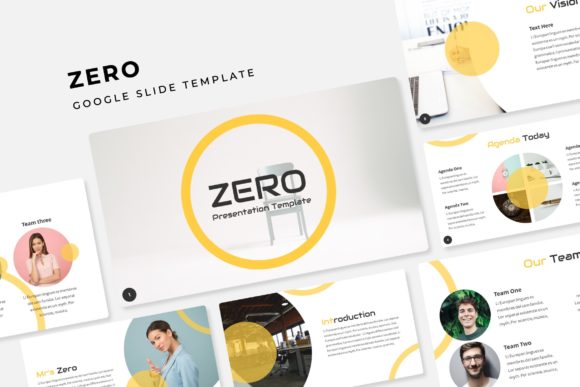
The versatility of a 150+ slide deck extends far beyond the corporate boardroom. The section break slides and gallery layouts included in the Zero Keynote Template make it a robust tool for a variety of creative applications.
For designers and photographers, the portfolio slides offer a clean, minimalist canvas to showcase work without distracting borders or effects. The focus remains on your imagery. For small business owners, the layout is perfect for creating lookbooks or pitching to investors. You can dedicate entire sections to product packaging, merchandise, or service breakdowns using the pre-designed grids.
Consider the needs of a social media manager or a blogger. A presentation is not just for speaking; it is a format for information. You can repurpose these slides into high-value PDFs, downloadable guides, or digital products. The widescreen format is optimized for modern monitors and projectors, ensuring your content looks sharp whether it is projected in a conference hall or viewed on a laptop screen. The pixel-perfect illustrations ensure that even if you export the slides as static images for a blog post or Instagram carousel, the quality remains high.
Customization and Color Theory
One of the standout features of this package is the inclusion of five distinct color variations. This is not merely about aesthetics; it is about adaptability. A pitch deck for a fintech startup requires a different visual language than a mood board for a wedding planner. By providing thirty slides per color template, the Zero Keynote Template allows you to switch the entire visual direction of your presentation with a single click, without breaking the underlying structure.
Furthermore, the template is fully editable. While the provided color schemes are expertly curated, you are not locked into them. The Master Slide architecture allows you to change global fonts and color palettes instantly. This is vital for maintaining brand recognition. If your company has specific brand guidelines, you can input your hex codes once, and the entire 150-slide deck will update to reflect your corporate identity. This ensures that every piece of communication you send out reinforces your brand, building trust and recognition over time.
Technical Excellence and Readability
A beautiful design is useless if the content is unreadable. The Zero Keynote Template prioritizes readability through its typographic hierarchy. The layout balances headline text with body copy, ensuring that there is enough white space to prevent cognitive overload. This is essential for educational materials, training decks, and detailed reports where information density is high but clarity is paramount.
The package includes links to free fonts, ensuring that you can replicate the exact look of the preview images without purchasing expensive commercial licenses. This attention to detail demonstrates an understanding of the user's workflow. It removes the friction of hunting for compatible fonts and ensures that the text renders correctly across different devices and operating systems.
Maximizing Your Investment
To get the most out of the Zero Keynote Template, approach it as a design system rather than a one-off file. Start by reviewing the "Readme First" file to understand the font requirements. Before you begin adding content, spend ten minutes exploring the Master Slides. Familiarize yourself with the different section breaks and infographic styles available.
When building your deck, think about the flow of information. Use the section break slides to signal a shift in topic, helping your audience mentally reset. Utilize the gallery slides to break up text-heavy sections with visual evidence of your work or products. Because the graphics are resizable and editable, don't be afraid to combine elements from different slides to create custom layouts that fit your specific narrative.
Ultimately, the goal of any presentation tool is to make you look good. By removing the technical barriers to good design, the Zero Keynote Template allows you to present your ideas with the confidence that comes from knowing your visuals are professional, consistent, and compelling. It transforms the daunting task of presentation design into a streamlined, creative process.