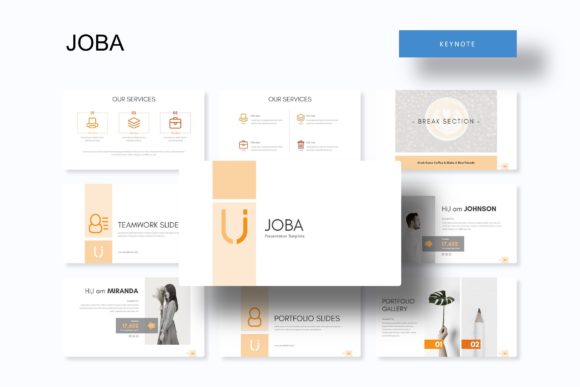
Joba Keynote Template: A Deep Dive into a 150+ Slide Powerhouse
You've got the idea, the data, and the strategy. Now you need to present it in a way that doesn't just inform, but captivates. We've all sat through presentations that were visually forgettable—a wall of text on a plain background. The Joba Keynote Template is engineered to be the opposite of that. It’s not just a collection of slides; it’s a comprehensive visual system designed to make your message land with impact and clarity.
Beyond Aesthetics: The Architecture of a Professional Deck
At its core, the Joba template understands that great presentations are built on a foundation of consistency and flexibility. The "150+ Total Slides" aren't just filler; they represent a curated library of layouts for every conceivable need. From intricate data visualization to clean portfolio showcases, each slide is crafted to serve a specific communicative purpose. The true power lies in the "5 Premade colors" structure, offering five distinct, fully developed color palettes with 30 slides each. This isn't a simple color swap. Each palette is a thoughtfully designed mood, allowing you to instantly align your deck with your brand's existing identity or the specific tone of your project—whether it's corporate, creative, energetic, or serene.
The inclusion of "Handcrafted Infographic in Powerpoint" is a significant time-saver. Instead of wrestling with shapes and connectors, you get professionally designed data storytelling tools that are ready to be populated with your numbers. The "Section Break Slides" and "Gallery and Portfolio slide" further demonstrate an understanding of narrative flow, providing visual pauses and dedicated spaces to showcase work, preventing cognitive overload for your audience.
Practical Applications: From Boardroom to Creative Studio
This template's utility extends far beyond the typical quarterly business review. Consider how its features solve real problems across different fields:
- For the Entrepreneur: Pitching to investors requires a deck that conveys professionalism and foresight. The "Pixel-perfect illustrations" and clean layouts of Joba help build credibility before you even speak. Use the portfolio slides to showcase product mockups or past successes.
- For the Marketer: Presenting a campaign strategy or social media analytics is clearer with dedicated "Handcrafted Infographic" slides. The drag-and-drop "Picture Placeholder" functionality lets you quickly integrate screenshots of ad creatives or social posts without breaking the design grid.
- For the Designer or Agency: Client presentations for branding, web design, or packaging projects are where this template shines. The "Gallery and Portfolio slide" is perfect for displaying logo concepts, website mockups, or product packaging in a polished, gallery-style format. The master slides ensure that every page of your brand guideline presentation feels cohesive.
- For the Educator or Trainer: Creating a workshop or course module becomes manageable. Use the section breaks to organize topics, and the variety of slide types to mix instructional content with interactive exercises or case studies.
Think of it as your visual communication toolkit. Whether you're outlining a marketing funnel, explaining a complex process, or telling your brand's origin story, there’s a slide structure within the Joba Keynote Template designed to support that specific goal.
Maximizing Your Impact: Working with the System
Getting the most out of a premium template like this involves more than just plugging in your text. Here’s how to leverage its features for maximum effect:
- Start with Strategy, Not Slides: Before opening the file, outline your key messages. This will help you choose the most appropriate slide layouts from the library, ensuring each visual element serves your narrative.
- Embrace the Master Slides: The "Based on Master Slides" architecture is your best friend for efficiency. Make global changes to fonts, colors, or footer information here, and watch them apply across your entire presentation. This guarantees "Visual consistency" and saves hours of manual editing.
- Leverage the Color Palettes: Don't default to the first color option. Consider your audience and setting. Is it a formal conference? A creative client meeting? An internal workshop? Choose the premade palette that best fits the psychological tone you want to set.
- Customize Thoughtfully: The "Resizable and Editable Graphic" elements are there to be adapted. Swap the placeholder icons with ones that better represent your industry. Adjust the color of a chart to match your brand's exact hex codes. The goal is to make the template feel uniquely yours.
- Test Your Typography: The template includes free font recommendations. While you have the freedom to use your own brand fonts, test how they interact with the slide layouts. Ensure headings are bold and clear, and body text remains highly readable, even from the back of a room.
The Details That Define Quality
What separates a good template from a great one often comes down to the finer points. The Joba Keynote Template includes "5 PPTX Widescreen" files, acknowledging the modern standard for displays. The "Pixel-perfect illustrations" ensure that when you zoom in on a diagram or icon, the lines are crisp and professional—no jagged edges in sight.
The practical "Readme First" file and included font links show a commitment to user experience, helping you get set up correctly from the start. A crucial note for commercial use: while the template provides the design framework, always verify the licensing for any included fonts or stock photography you intend to use in your final project. The preview images are for "illustration purpose only," reminding us to source our own final assets responsibly.
In the end, the Joba Keynote Template is more than a set of pretty slides. It’s a structured, adaptable system for anyone who needs to communicate ideas with visual confidence. It reduces the friction of design, allowing you to focus on what truly matters: your content and your connection with the audience. Whether you're building a brand, closing a sale, or teaching a skill, having a robust visual foundation can make all the difference in how your message is received and remembered.