Umnics Google Slides: The Complete Template for Polished Pitch Decks
You have a brilliant idea, a solid business plan, or a critical quarterly update to share, but the mere thought of starting a presentation from a blank slide makes you want to procrastinate until next week. We have all been there—staring at a white canvas, fiddling with alignment tools, and spending hours hunting for icons that actually match. The friction between your great content and a professional visual output is real, and it often results in presentations that look disjointed or generic. This is exactly where the Umnics Google Slide Template steps in, not just as a set of pre-made layouts, but as a comprehensive design system intended to bridge the gap between amateur slideshows and high-end visual storytelling.
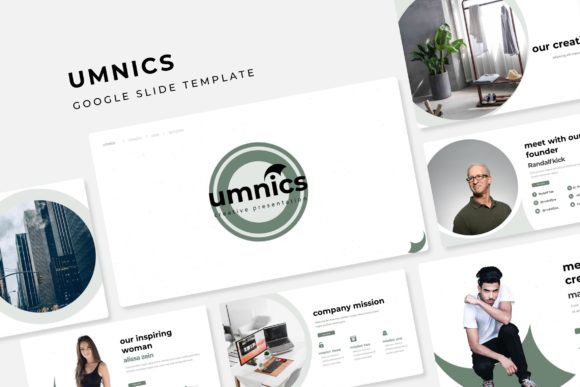
For the entrepreneur, the marketing manager, or the freelancer, time is the most valuable currency. The Umnics template is built on the premise that you should be spending your time refining your message, not resizing text boxes. With over 150 total slides included, this package is massive, but it avoids the common pitfall of quantity over quality. It offers 5 premade color themes, giving you distinct visual identities right out of the box. Whether you are pitching a tech startup that needs a sleek, modern edge or a lifestyle brand that requires something warmer and more inviting, having 30 slides per template variation ensures you have a cohesive narrative arc from start to finish without repeating layouts.
Mastering Visual Consistency with Modern Typography
One of the most overlooked aspects of a successful presentation is the underlying structure. We have all seen slides where the font sizes jump erratically, or the colors are slightly off-brand. The Umnics template solves this through its Master Slides architecture. Because every design is based on master slides, your visual identity remains locked in and consistent. If you decide halfway through that your header font needs to be darker or your background needs a subtle shift, you make that change once in the master, and it ripples across your entire deck. This is the kind of visual consistency that builds brand recognition and makes you look incredibly prepared.
Typography plays a massive role here. The package includes a curated selection of free fonts, and the designers have clearly understood the importance of font pairing. In the world of modern typography, mixing a clean sans serif font for body text with a distinct display font for headers creates a hierarchy that guides the viewer's eye. This isn't just about looking pretty; it is about readability. When you are presenting to a room or sharing a PDF, your audience needs to grasp your key points instantly. The text layouts in Umnics are optimized for this, ensuring that your data and narrative are legible on screens of all sizes.
Infographics and Data Visualization Made Simple
Let’s talk about the "boring" parts of a presentation: the data. Most of us struggle to make statistics look interesting. We end up pasting a messy Excel chart onto a slide and hoping for the best. The Umnics collection takes a different approach with handcrafted infographics. These aren't just standard bar graphs; they are visual assets designed to make complex information digestible and engaging.
Whether you are illustrating a timeline, a workflow process, or a comparison matrix, these infographics help with audience engagement. They transform abstract numbers into a story. For a small business owner or marketer, this is crucial. You can turn a dry sales report into a compelling case study using these pre-designed elements. Because the graphics are resizable and editable, you aren't stuck with the default look. You can change colors to match your specific brand identity or adjust the layout to fit your specific data set. This flexibility is what separates a premium font and template package from the free options you find scattered across the web.
Drag-and-Drop Efficiency for the Busy Creator
We need to address the workflow. If you are a content creator, blogger, or creative entrepreneur, you likely wear many hats. You don't have time to learn complex design software just to make a slide deck. The beauty of this Google Slides (and PowerPoint) setup is the drag & drop functionality.
The picture placeholders are a game-changer. Instead of trying to crop your images into perfect circles or specific aspect ratios manually, the template does the heavy lifting. You simply drag your high-resolution photo into the designated area, and it snaps into place, pixel-perfect. This pixel-perfect illustration standard ensures that your imagery looks crisp and professional. It removes the technical barrier to entry, allowing you to focus on the content. Whether you are putting together a portfolio to show off your latest graphic design work, creating a pitch deck for investors, or organizing a workshop for your community, the mechanics of building the deck become second nature.
Beyond the Pitch: Versatility for Branding and Marketing
While "Google Slides" implies a presentation, the utility of the Umnics template extends much further. Think of it as a design toolkit for marketing assets. You can easily repurpose these slides for various creative needs.
For instance, the Gallery and Portfolio slides are perfect for editorial layouts. If you are a photographer or an artist, you can export these slides as PDFs to create lookbooks or digital brochures. The Section Break Slides are visually striking enough to be used as standalone social media graphics or story backgrounds. By utilizing the 5 color variations, you can create a series of digital products or packaging inserts that look cohesive but distinct.
Consider the versatility for different industries:
- Web Design & Tech: Use the darker color themes for sleek app demos or software feature breakdowns.
- Lifestyle & Beauty: Utilize the warmer palettes and ample image placeholders for mood boards and brand guidelines.
- Education & Corporate: Leverage the infographics for training manuals and quarterly business reviews.
The ability to switch between Google Slides and PowerPoint (5 PPTX files are included) means you are never locked into one ecosystem. You can collaborate with a team on Google Drive and then download the final version as a PowerPoint file for a client who prefers Microsoft Office. This cross-compatibility is essential in a diverse professional environment.
Practical Tips for Getting the Most Out of Your Template
To truly elevate your presentation using the Umnics set, it helps to approach it with a strategy. First, review the included font styles carefully. The "Readme First" file included in the download is there for a reason—it contains the links to the free fonts used in the preview. Downloading and installing these before you begin will save you from the headache of layout shifts and missing text later.
Next, focus on matching typography to your project goals. If your brand is serious and authoritative, stick to the sans-serif combinations provided. If you are in a creative field like crafting or art direction, you might lean into the bolder display fonts for headers to inject more personality. Don't be afraid to test different pairings within the master slides to see what feels right for your specific brand identity.
Finally, remember that while the template provides the structure, the content is still king. Use the ample white space provided in these layouts to let your message breathe. Avoid the temptation to fill every empty corner with text. The professional presentation is defined as much by what is left out as what is put in. By combining the high-quality design assets of the Umnics template with your unique voice and strategic content, you create a presentation that doesn't just share information—it commands attention and drives action.