Nakita Keynote Template: Your Toolkit for Polished, Professional Slides
Every entrepreneur, marketer, or creative professional has faced that moment of dread—staring at a blank presentation canvas, knowing a crucial pitch, workshop, or client update is due. You need slides that look like they were designed by a professional studio, but you don’t have the time or budget to hire one. This is where a thoughtfully constructed template system becomes less of a luxury and more of a strategic asset. The Nakita Keynote Template isn't just a set of pretty slides; it's a comprehensive design framework built to communicate ideas with clarity and visual impact.
A Visual Language for Your Brand Story
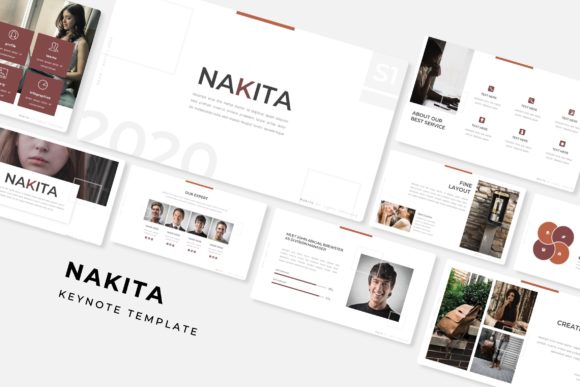
What immediately sets this system apart is its commitment to visual cohesion. With 150+ total slides organized across five distinct, premade color palettes, you’re not just getting a single look—you’re getting five potential brand personalities to explore. Each of the five color themes contains 30 meticulously designed slides, providing ample room to develop a full narrative arc for any project. This structure is invaluable for maintaining brand consistency across a series of presentations, from initial pitch decks to final reports.
The visual appeal lies in the details. Handcrafted infographics transform complex data into engaging stories, while dedicated section break slides provide a clean, professional pause for your audience. The gallery and portfolio slides are particularly useful for designers, photographers, or agencies needing to showcase work without wrestling with layout grids. Every element, from the pixel-perfect illustrations to the resizable, editable graphics, is designed to feel intentional and polished.
Practical Applications Beyond the Boardroom
While a stellar presentation is the obvious use case, the assets included in this template pack have versatile applications across your creative workflow. The thoughtfully designed layouts can serve as a springboard for a variety of projects.
- Brand & Marketing Assets: Use the infographic sections to create standalone social media graphics or blog post visuals. The clean typography and structured layouts can inspire the design of one-pagers, service menus, or digital brochures.
- Digital Products & Content: Course creators and educators can adapt the slide templates to design engaging lesson modules or downloadable worksheets. The section breaks are perfect for chapter dividers in a digital guide.
- Pitch & Proposal Design: Entrepreneurs can leverage the professional aesthetic to design compelling pitch decks, partnership proposals, or investor updates that convey credibility and attention to detail.
The key is to view these not as rigid slides, but as a library of design components—master slides, content blocks, and visual elements—that can be mixed, matched, and repurposed to build a cohesive visual identity across multiple touchpoints.
Streamlining Your Design Process
One of the greatest practical benefits of a template like Nakita is the time it gives back to you. The drag-and-drop functionality, based on master slides, means you can swap out images and text without breaking the layout. The included picture placeholders are a game-changer for non-designers; simply drag your photo into the designated area, and it scales perfectly. This eliminates the frustration of misaligned elements and awkward cropping.
The package includes everything you need to get started immediately: five PPTX files in widescreen format, a helpful Readme file, and details on the free font used, so there are no hidden hurdles. It’s a self-contained design system. For the busy small business owner or content creator, this means less time fiddling with software and more time focusing on your message and your audience. The result is a more professional presentation that builds trust and enhances your brand recognition through consistent, high-quality visuals.
Making It Your Own
The true power of this toolkit is unlocked when you customize it. Start by selecting the color theme that best aligns with your brand’s energy—whether it’s vibrant and bold or calm and sophisticated. From there, consider the typography. The template uses a free, accessible font, but don’t be afraid to explore font pairings if you have a specific brand typeface. A clean sans-serif for body text paired with a complementary serif for headlines can add a layer of sophistication.
Always test your slides for readability. Ensure there is sufficient contrast between text and background colors, and keep your copy concise. The included layouts are designed to highlight key points, not to house paragraphs of text. Use the portfolio and gallery sections to tell visual stories, and let the infographics simplify the complex. By treating the Nakita Keynote Template as a flexible starting point rather than a finished product, you empower yourself to create presentations that are not only beautiful but uniquely and authentically yours.