Magiesto Keynote Template: Build Decks That Captivate and Convert
We’ve all been there. The meeting is in an hour, the presentation deck is a hodgepodge of mismatched slides, and the "brand colors" are more of a suggestion than a rule. It’s a fast track to looking unprepared. The difference between a presentation that lands and one that falls flat often comes down to visual consistency and professional polish. That’s where a tool like the Magiesto Keynote Template shifts from being a nice-to-have to a genuine game-changer for your workflow and your brand’s perception.
A Visual System, Not Just a Set of Slides
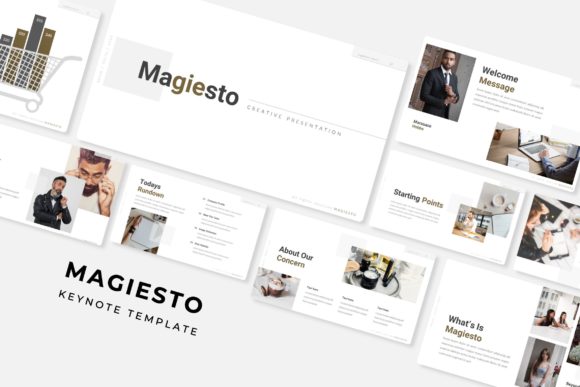
Think of Magiesto not as a collection of 150+ slides, but as a comprehensive visual communication system. The core strength lies in its structure: five distinct, premade color palettes, each with a complete 30-slide template built around it. This isn’t about having a lot of options; it’s about having the right, cohesive options ready to go. Whether your brand identity leans towards sleek and corporate or vibrant and creative, one of the five color variations will likely resonate, giving you an instant foundation of visual harmony. This eliminates the guesswork and the time-consuming process of trying to force colors to work together.
Every element within the Magiesto Keynote Template is designed for real-world use. The graphics are pixel-perfect illustrations, meaning they look sharp on any screen, from a laptop to a large conference room display. More importantly, they are fully resizable and editable. You can adjust the weight of an icon, change the color of a chart segment, or reposition an infographic element without losing quality. The picture placeholders are a standout feature—they’re truly drag-and-drop. Simply drop your image into the designated area, and it automatically resizes to fit the frame perfectly, maintaining the design’s integrity. This is based on master slides, so changes you make to the design system propagate throughout, ensuring every slide in your deck remains consistent.
Practical Applications Beyond the Boardroom
While perfect for quarterly reviews and investor pitches, the utility of a template like Magiesto extends far beyond traditional business presentations. Consider these scenarios:
- Client Pitches & Proposals: A marketing agency can use the portfolio and gallery slides to showcase past campaign work in a visually compelling narrative. The section break slides help guide the client through the proposal story, from problem to solution.
- Workshops & Educational Content: The handcrafted infographics are ideal for explaining complex processes, statistics, or step-by-step guides. They transform dense information into digestible, engaging visuals for your audience.
- Product Launches & Sales Decks: Use the clean layouts to highlight product features, benefits, and pricing. The consistent design builds trust and keeps the focus on your value proposition.
- Social Media Content Creation: While not a social media template per se, the individual slides can be easily exported as images. A beautifully designed statistics slide or a quote graphic can become a standalone post for LinkedIn or Instagram, elevating your feed’s aesthetic.
- Internal Communications & Reports: Make internal updates, project reports, or team meeting agendas more engaging and easier to follow. A well-designed deck respects your team’s time and attention.
For freelancers and small business owners, having a library like this means you can produce professional-grade materials quickly, allowing you to focus on the content and strategy rather than getting bogged down in design minutiae. It’s about working smarter, not harder.
Ensuring Your Message is Heard: Design Meets Strategy
A beautiful template is only effective if it supports your communication goals. The Magiesto Keynote Template’s design choices are strategic. The use of clean, modern typography enhances readability, ensuring your key points aren’t lost in decorative fonts. The ample white space and structured layouts guide the viewer’s eye naturally from one element to the next, improving information retention and audience engagement.
When you adopt a system like this, you inherently improve your visual consistency. Every slide, whether it’s an intro, a data-heavy chart, or a thank you page, shares the same design DNA. This consistency builds brand recognition over time. Your audience starts to associate that polished, professional look with your business, which strengthens your brand identity and credibility.
The practical advice here is simple: don’t just use the template as-is. Use it as a starting point. Experiment with the font pairings included. While the template specifies fonts, understanding how to pair a serif font with a sans serif font for contrast can further customize your look. Always test your final deck on the actual device you’ll be presenting from—check that text is legible from the back of the room and that colors display as intended. Remember, the included fonts are free for commercial use, so you have full licensing peace of mind for your projects.
Getting Started and Making It Your Own
Upon downloading, the “Readme First” file is your essential guide. It details the included files (five PPTX widescreen files) and, crucially, provides the link for the free font download. Installing the fonts is a non-negotiable first step to ensure everything renders correctly.
The real power comes from customization. Swap out the placeholder images with your own high-quality photography or brand imagery. Adjust the color palette if one of the five premade options is close but not perfect—using the master slides makes this a systematic change. Don’t feel obligated to use every single slide. Curate the ones that tell your story most effectively. The section break slides are particularly useful for creating clear chapters in your presentation, helping your audience mentally organize the information.
Think of the Magiesto Keynote Template as a professional designer’s toolkit that you now have access to. It provides the structure, the assets, and the polish, freeing you to concentrate on what you do best: crafting a compelling message, building your brand, and connecting with your audience. It’s a practical asset that turns the chore of presentation design into a streamlined, even enjoyable, part of your creative and business process.