Ramora: The All-in-One Google Slide Template for Modern Brands
There's a familiar frustration that hits when you open a blank presentation file. You have a clear vision for your brand, a powerful message to deliver, but the tools you're using feel like they're working against you. You spend hours fiddling with alignments, searching for a color palette that doesn't look generic, and trying to make standard charts feel, well, less standard. The result is often a presentation that feels disjointed from the rest of your brand identity, a missed opportunity to create a truly cohesive and professional impression. This is where a thoughtfully designed system, like the Ramora Google Slide Template, shifts the entire dynamic from a chore to a creative advantage.
A Visual System, Not Just a Slide Deck
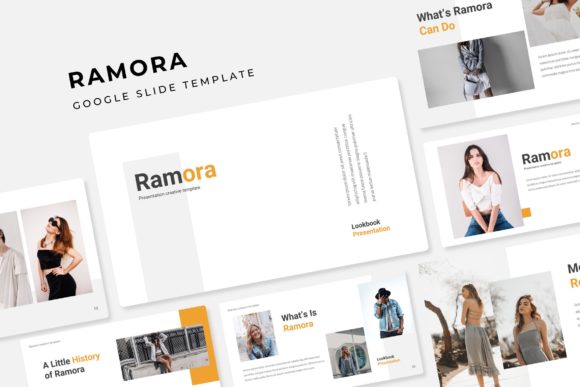
What immediately sets Ramora apart is its approach as a comprehensive visual system. It’s built on the understanding that a brand’s presentation needs to be as consistent and polished as its website or social media graphics. The foundation of this system is its structure: 150+ total slides are meticulously organized across five premade color themes. Each theme provides 30 unique slides, giving you a substantial and varied library to work with. This isn’t a collection of random layouts; it’s a curated toolkit where every element, from section break slides to portfolio galleries, is designed to work in harmony.
The practical value of this structure is immense. For a small business owner preparing a pitch deck, it means you can move from an introductory overview to detailed financials and a portfolio showcase without the design ever feeling jarring. For a content creator or marketer, it means building a webinar series or a course curriculum where each module feels intentionally crafted and connected. The five distinct color palettes allow you to instantly match the template to a client’s brand or your own evolving style, ensuring visual consistency is baked right into the process.
Designed for Real-World Workflow
A template’s worth is ultimately judged by how it performs under real-world pressure—tight deadlines and last-minute edits. This is where Ramora’s technical features become your silent partners in efficiency. Every graphic, icon, and layout is built on master slides. This means when you need to make a global change to a font style or color accent, you do it once, and it updates throughout the entire presentation. It’s a foundational feature that prevents the nightmare of manual, slide-by-slide adjustments.
Furthermore, the template embraces a drag-and-drop philosophy. Picture placeholders are clearly defined, allowing you to simply drag an image from your folder directly into the designated space. The graphic scales and crops perfectly to fit, eliminating the tedious resizing and repositioning that eats up creative time. This pixel-perfect attention to detail extends to the handcrafted infographics. Instead of struggling to build a complex timeline or process chart from scratch, you have a library of professionally designed, editable graphics that you can adapt to your data. It transforms a potentially hours-long design task into a matter of minutes, letting you focus on the content and strategy behind the visuals.
From Pitch Decks to Product Launches: Practical Applications
The versatility of a well-structured template system like this opens up a wide range of applications for professionals across various fields. Consider these scenarios:
- For Branding and Marketing: Use the gallery and portfolio slides to create a stunning brand guidelines presentation or a case study that showcases your work with clarity and style. The cohesive design reinforces your brand identity at every turn.
- For Entrepreneurs and Small Businesses: Craft compelling investor pitch decks, sales proposals, or internal strategy meetings that look polished and trustworthy. The professional presentation builds credibility before you even speak a word.
- For Content Creators and Educators: Design engaging online course modules, workshop materials, or webinar slides that keep your audience focused. The clean layouts and editable infographics are perfect for explaining complex information visually.
- For Agencies and Freelancers: Rapidly produce client-facing presentations, social media strategy decks, or project kick-off documents that reflect the high quality of your services. The ability to customize colors and layouts quickly is a huge asset when juggling multiple clients.
Each slide type serves a purpose. The section break slides provide a visual pause and a chance to re-engage your audience. The infographic slides turn boring bullet points into memorable, digestible data stories. The portfolio slide offers a dedicated, beautifully framed space to let your best work shine.
Maximizing Your Investment: Tips for Effective Use
To get the most out of a resource like Ramora, a bit of strategic thinking goes a long way. First, don’t just default to the first color theme. Take a moment to consider the mood and audience of your presentation. A deep, muted palette might convey sophistication for a financial report, while a brighter theme could energize a creative workshop proposal. The five provided options are a starting point for exploration.
Second, leverage the master slides intentionally. Before adding your content, open the master slide view. You can see how the entire system is constructed and even make subtle adjustments to fonts or accent colors there to further personalize the template while maintaining its integrity. This is how you move from using a template to truly owning it as part of your design assets.
Finally, remember that the template is a framework for your content. The most impactful presentations have a clear narrative. Use the logical flow of the slides to structure your story—problem, solution, evidence, call to action. The design should support and elevate that narrative, not distract from it. The clean, modern typography and ample white space in Ramora are designed precisely for this, ensuring your message remains the hero.
Ultimately, a tool like the Ramora Google Slide Template is about removing friction. It handles the heavy lifting of design consistency, layout, and visual polish, freeing you to concentrate on what you do best: communicating your ideas, building your brand, and connecting with your audience. In a world where first impressions are often digital, having a presentation system that works as hard as you do isn't just convenient—it's a strategic advantage.