Mimo Google Slide Template: A Designer's Guide to This Colorful Asset
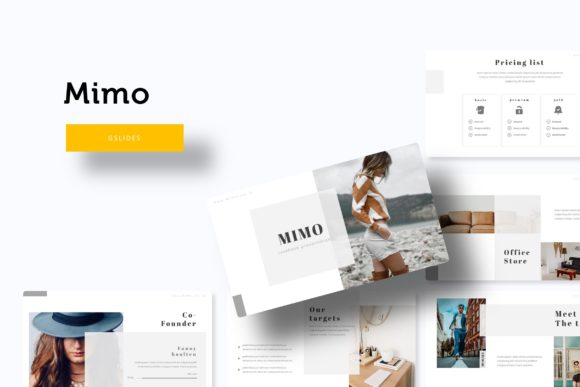
Every designer knows the struggle: you have a brilliant concept, but assembling a cohesive presentation from scratch eats into valuable creative time. The Mimo Google Slide Template offers a solution that feels less like a generic tool and more like a thoughtfully crafted design system. With over 150 total slides organized across five distinct premade color themes, it provides a substantial foundation for anyone needing to communicate ideas visually, whether for a client pitch, an internal strategy meeting, or a creative portfolio review.
Understanding the Visual Framework
At its core, this template package is built on principles of modern typography and visual hierarchy. The 30 slides for each of the five color variations aren't just recolored duplicates; they're designed to maintain the same structural logic while shifting the mood entirely. This approach solves a common problem in branding and marketing: maintaining visual consistency across different contexts without becoming monotonous. A marketing team might use the calm blue theme for a quarterly report, then switch to the energetic orange variation for a product launch pitch, all while keeping the same professional slide architecture.
The handcrafted infographics deserve particular attention. Unlike many template packs where charts and diagrams feel like afterthoughts, these elements are integrated into the overall design language. They use the same color palettes, line weights, and spatial relationships as the text-heavy slides, creating a seamless transition between data visualization and narrative content. For small business owners presenting financials or educators explaining processes, this integration means less time spent manually adjusting colors and alignment to match the rest of their deck.
Practical Applications Beyond the Obvious
While presentation templates naturally serve pitch decks and reports, the Mimo system's design makes it surprisingly versatile for other creative projects. The resizable and editable graphics work well for creating social media assets—extract a single infographic panel, adjust the dimensions, and you have an Instagram carousel or LinkedIn post that matches your brand identity. The picture placeholder system with drag-and-drop functionality simplifies the process of creating lookbooks or portfolio presentations for photographers, interior designers, or fashion brands.
Consider how the template's structure can inform your packaging design process. The section break slides, with their clean layouts and strategic use of whitespace, can serve as mood board templates when presenting packaging concepts to clients. The pixel-perfect illustrations provide a consistent visual vocabulary that can extend from the presentation into actual product mockups, creating a cohesive brand experience from first pitch to final product.
Typography in Action: Making the Most of the Included Fonts
The template includes specific font recommendations with free download links, which is a thoughtful detail that many competitors overlook. This allows for true visual consistency between the presentation and other brand materials. When choosing which font pairing to use from the options provided, consider both readability and personality. A sans-serif font might work best for clean, corporate presentations, while a serif option could add warmth to creative or editorial pitches.
Testing these font pairings in context is crucial. Don't just look at them in isolation—see how they perform with your actual content. How do the headers hold up with longer titles? Does the body text remain readable when projected on a screen versus viewed on a laptop? The template's master slide system makes this testing process efficient, as changes to font styles automatically update throughout the entire deck.
Workflow Efficiency and Customization
The true value of a template like this emerges in the time it saves during actual use. The master slide architecture means that when you need to adjust a global element—like changing the accent color or adjusting header spacing—you do it once and the change propagates through all 150+ slides. For marketing professionals juggling multiple campaigns or entrepreneurs wearing several hats, this efficiency translates directly into more time for strategy and less time on formatting.
The gallery and portfolio slide layouts demonstrate thoughtful design planning. They provide multiple arrangement options for showcasing work, from grid layouts to full-bleed image displays, all while maintaining the template's visual rhythm. This is particularly valuable for creative agencies presenting client work or artists compiling exhibition materials—the template doesn't force your content into rigid boxes but offers structured flexibility.
Considering Your Specific Needs
Before committing to any design asset, consider how it aligns with your typical projects. If your work involves frequent data presentation, examine the infographic templates closely—do they support the types of charts and diagrams you commonly use? If you're primarily creating visual portfolios, focus on the image placeholder systems and layout options. The five premade colors offer good starting points, but consider how easily you could adapt them to your existing brand palette.
Remember that while the template provides a professional foundation, your unique perspective and content will ultimately determine its effectiveness. The best presentations don't just look good—they communicate clearly and connect with their audience. Use the template's structure to organize your thoughts logically, but let your own voice and expertise shape the narrative.
For those working in commercial contexts, verify the licensing terms match your intended use. While the fonts included are free for commercial use according to the provided links, always double-check current license terms, especially if you're creating materials for resale or widespread distribution. This due diligence protects both you and your clients while allowing you to leverage the template's full potential across multiple projects and campaigns.