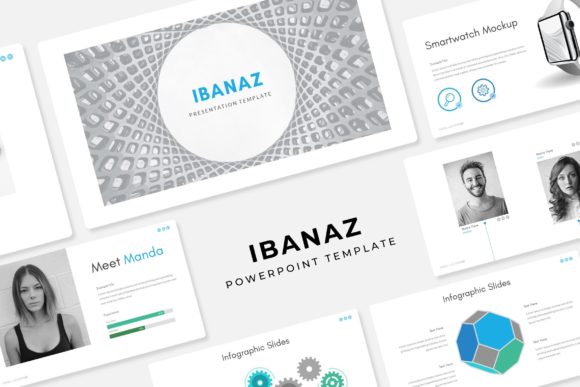
Transform Your Slides with the Ibanaz PowerPoint Template
Imagine walking into a pitch meeting, a webinar, or a community workshop. You open your laptop, connect to the projector, and the first slide hits the screen. Instead of the usual white background with bullet points, the audience is greeted by a pixel-perfect illustration, a handcrafted infographic, and a color palette that feels cohesive and intentional. That is the difference a high-quality presentation asset makes. It shifts the dynamic from "reading a document" to "watching a story." For anyone managing a brand, teaching a course, or pitching an idea, the visual weight of your slides matters just as much as the words you speak.
Visual Consistency and the Power of Pre-Made Color Palettes
One of the biggest challenges in design—whether it is for a slide deck, a website, or a social media feed—is maintaining consistency. We have all seen presentations where the font changes on every other slide, or the background colors clash violently with the photos. It creates a subconscious friction for the viewer, making the content feel less trustworthy. This is where the structure of a robust template system becomes a game-changer for your workflow.
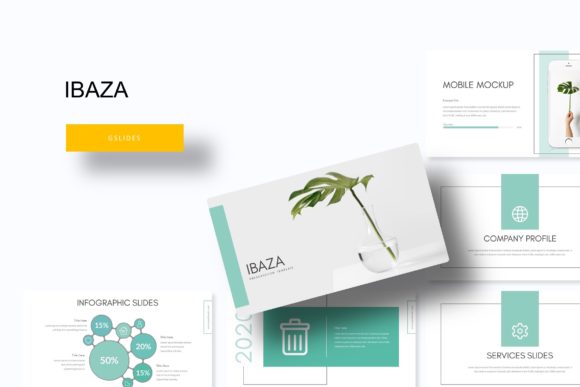
The Ibanaz Power Point Template is built specifically to solve this fragmentation. With over 150 total slides and five distinct premade color schemes, it offers a level of variety that prevents visual fatigue without sacrificing brand identity. You aren't just getting one look; you are getting five different moods or brand directions right out of the box. Each color variation includes 30 slides, ensuring that every transition, chart, and portfolio layout is tuned to that specific aesthetic.
Think about the practical application here. If you are a creative agency, you might use the deep navy variation for corporate clients and switch to a vibrant coral palette for lifestyle brands. For a small business owner, this flexibility means you can create seasonal marketing assets. You could use a cool, crisp color scheme for a Q1 strategy meeting and a warm, earthy tone for a summer product launch. This adaptability is crucial for anyone looking to maintain a fresh but consistent visual language across different campaigns.
From Infographics to Portfolios: Real-World Applications
A presentation template is only as good as its utility. It needs to handle data-heavy slides just as well as it handles image-heavy ones. The inclusion of handcrafted infographics within the Ibanaz Power Point Template is a significant advantage for marketers and educators. Data visualization is notoriously difficult to do well from scratch. Creating a custom bar chart or a process flow diagram in PowerPoint often results in misaligned shapes and clunky visuals.
By utilizing pre-designed, pixel-perfect illustrations, you ensure that your data tells a clear story. This is vital for annual reports, marketing overviews, or educational modules where clarity is paramount. The drag-and-drop functionality, based on Master Slides, means you aren't fighting the software to resize elements. You simply swap the placeholder with your own graphics, and the layout remains intact.
Furthermore, the dedicated gallery and portfolio slides offer a clean canvas for visual storytelling. If you are a photographer, interior designer, or graphic artist, your work needs to breathe. Cluttered slides distract from the imagery. The Ibanaz layout allows for full-bleed images or structured grids that frame your work professionally. It transforms a standard PowerPoint file into a digital lookbook or a pitch deck that rivals the quality of a dedicated design software output.
Optimizing Your Workflow with Drag-and-Drop Efficiency
Time is the most valuable resource for any entrepreneur or content creator. The technical friction of wrestling with design software often leads to procrastination or subpar results. The architecture of this presentation pack is designed to remove those barriers. Because the graphics are resizable and editable, and based on a Master Slide structure, you can make global changes in seconds.
Imagine you decide halfway through the project that your primary brand color needs to be slightly darker. In a poorly designed template, this would mean manually editing 30 individual slides. With a Master Slide-based system, you update the source once, and the change cascades throughout the entire document. This is not just a convenience; it is a safeguard against errors and a massive boost to productivity.
For those creating digital products or marketing assets, this efficiency allows for rapid prototyping. You can draft a proposal in the morning, tweak the color scheme for a different client in the afternoon, and export the final files for print by evening. The inclusion of widescreen (16:9) PPTX files also ensures that your content looks modern and fills the screen on contemporary monitors and projectors, eliminating those awkward black bars on the sides of your presentation.
Typography and Pairing: The Foundation of Readability
While the visuals and layout grab attention, typography holds the attention. The Ibanaz template utilizes a specific set of fonts (with free download links included) to ensure that the text hierarchy is logical and readable. When selecting a template or a font for your own projects, the relationship between the headline and the body copy is critical.
You generally want a high-contrast pairing—perhaps a bold, modern display font for titles paired with a clean, legible sans-serif for the body text. This ensures that your audience can scan the slide quickly to get the main point (the headline) and then settle in to read the details (the body copy) without straining their eyes.
When applying this to your broader branding efforts—whether on a website, packaging, or social media graphics—consistency is key. If you use a specific style of typography in your presentation, consider echoing that in your email headers or your Instagram stories. This creates a seamless experience for your audience. They recognize your content instantly, whether they are viewing it on a slide deck or a printed brochure.
Commercial Licensing and Project Scalability
For designers and entrepreneurs, the question of licensing is always front and center. When you download design assets, you need to know that you have the rights to use them for commercial purposes. The assets included in this package—specifically the fonts and the template structure—are designed for professional use.
This opens up a wide range of possibilities beyond just internal meetings. You can use the templates to create client deliverables, digital downloads for sale, or marketing materials for your products. The versatility of the slides means they can be repurposed for different contexts. A "Team Introduction" slide can easily become a "Meet the Instructor" slide for an online course. A "Product Feature" slide can be adapted for a "Service Offering" in a consulting proposal.
It is also worth noting the importance of the "Readme First" file included in such packs. Taking five minutes to review this documentation can save you hours of troubleshooting. It usually contains specifics about the font versions, installation instructions, and details on the color codes used. This small step ensures that your final output matches the high-quality preview you saw initially.
Elevating Your Brand Narrative
Ultimately, a tool like the Ibanaz Power Point Template is about more than just aesthetics; it is about credibility. In a crowded market, whether you are selling handmade crafts or pitching a software solution, the polish of your presentation signals the quality of your work. A well-designed slide deck suggests that you pay attention to details, that you value your audience's time, and that you are serious about your message.
By leveraging the 150+ slides, the handcrafted infographics, and the structured color variations, you equip yourself with a robust visual toolkit. It allows you to focus on what you do best—creating, selling, teaching, or connecting—while the template handles the heavy lifting of visual communication. Whether you are designing a brand identity from scratch or refreshing an existing marketing strategy, having a reliable, flexible, and professionally designed foundation makes all the difference.