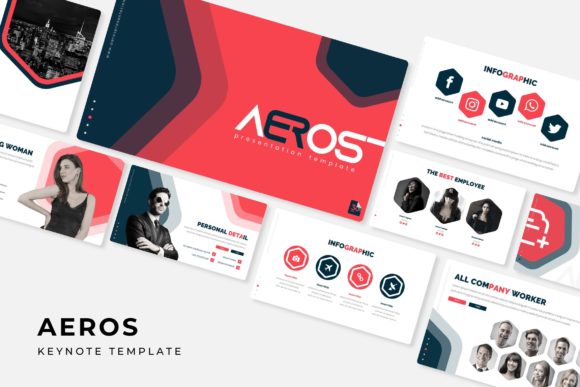
Streamline Your Next Pitch with the Aeros Keynote Template
You know the feeling. It’s the night before a major presentation—the one meant to secure funding, launch a product, or align your entire team—and you’re staring at a blank slide. The cursor blinks, mocking you. You have the data, the strategy, the vision, but the visual framework to deliver it all is missing. This is where countless hours get lost wrestling with alignment, color palettes, and placeholder text. A powerful idea deserves more than a generic, default slide deck. It needs a canvas that is both structured and visually compelling, designed to let your content shine without the design headache. Enter a solution built for the modern professional who values both aesthetics and efficiency.
A Foundation Built for Visual Storytelling
The Aeros Keynote Template isn't just another collection of slides; it's a comprehensive presentation system designed to eliminate the friction between your ideas and their visual execution. At its core, it offers a staggering 150+ total slides, providing a vast library of layouts for any conceivable need. But the true genius lies in its organization and design philosophy. The template comes in 5 premade color schemes, each containing 30 meticulously crafted slides. This means you’re not just getting variety in quantity, but in mood and tone. Whether you need the professional gravitas of a deep navy, the energetic pop of a vibrant coral, or the clean minimalism of a soft gray, the right palette is already calibrated and ready to deploy, ensuring instant visual consistency from your opening hook to your closing call to action.
Visual communication is about clarity and impact. Aeros supports this with handcrafted infographics that transform complex data into digestible, engaging stories. Forget about struggling to build a pie chart or a timeline from scratch; these are professionally designed, pixel-perfect illustrations that you can edit directly. The inclusion of dedicated section break slides is a thoughtful touch, allowing you to clearly demarcate different chapters of your narrative, guiding your audience through your logic with visual cues. For those showcasing work, the gallery and portfolio slides provide a polished, elegant way to display images, case studies, or product shots, elevating your proof of concept from a simple screenshot to a curated exhibit.
Practicality Meets Professional Polish
Time is a non-renewable resource, especially for entrepreneurs, marketers, and agency designers. Aeros is engineered to respect that. The entire system is based on master slides and features a drag-and-drop picture placeholder functionality. This isn't a minor convenience; it's a workflow revolution. You can swap out images in seconds, reposition elements without breaking the layout, and ensure every single component is perfectly aligned because it adheres to a master grid. The graphics are fully resizable and editable, meaning you can scale an icon or adjust a diagram’s color to match your brand’s exact hex codes without losing quality or needing external software.
This level of customization is crucial for brand identity. A presentation is a direct extension of your brand’s visual language. With Aeros, you can ensure that every slide reinforces your brand recognition. The clean, modern typography and balanced white space contribute to superior readability, keeping your audience focused on your message rather than distracted by cluttered design. The template’s structure encourages you to present information in a logical, audience-friendly flow, which inherently boosts engagement and retention.
Unlocking Creative and Commercial Potential
The applications for a robust, versatile template like this extend far beyond a standard boardroom pitch. Consider the breadth of projects where a premium, ready-to-use presentation framework becomes an invaluable design asset.
- Brand Strategy & Guidelines: Use the slide library to build a comprehensive brand book, showcasing your logo, color palette, typography, and voice in a cohesive, professional format.
- Marketing Campaign Proposals: Structure a multi-channel campaign rollout, dedicating sections to social media graphics, web design mockups, and print material previews.
- Investor Decks & Business Plans: Present your financials, market analysis, and roadmap with the clarity and confidence that polished visuals provide.
- Product Launches & Packaging Concepts: Create stunning visual presentations of new products, using the portfolio slides to display packaging design variations and merchandise mockups.
- Educational Workshops & Webinars: Develop engaging course materials or webinar decks that use infographics to explain complex processes, enhancing learning and comprehension.
- Creative Portfolios: For designers, photographers, or artists, the template offers a sleek, minimalist stage to let your work speak for itself, whether for client reviews or gallery submissions.
By providing a structured yet flexible canvas, Aeros acts as a creative catalyst. It allows you to think about your content strategy and messaging rather than getting bogged down in the technicalities of slide design. The result is not only a faster workflow but a more polished, cohesive, and professional final product that can significantly elevate how your audience perceives your brand or idea.
What You Receive and Getting Started
Clarity on deliverables is key. The Aeros package includes 5 PPTX files (standard aspect ratio) and 5 PPTX widescreen files, ensuring compatibility with different display setups. You also get the 5 premade color themes as separate, ready-to-use files. A detailed Readme First file is included, which is essential reading as it contains the links to download the free fonts used in the template. This is a critical step to maintain the exact typographic look and feel. It’s important to note that while the template provides the design framework, the photographs and pictures used in previews are for illustration only and are not included, allowing you to fully customize it with your own branded imagery.
When you first open the file, take a moment to explore the slide master. Familiarize yourself with the placeholder structures and color themes. Start by selecting the color variation that best aligns with your brand’s personality. Then, begin replacing the placeholder text and images with your own content. The true power of Aeros reveals itself as you watch your raw data and ideas transform into a compelling visual story, slide by slide, with minimal effort and maximum impact. It’s about working smarter, not harder, and presenting your best self to the world.