Specktackle Google Slides: A Comprehensive Design System
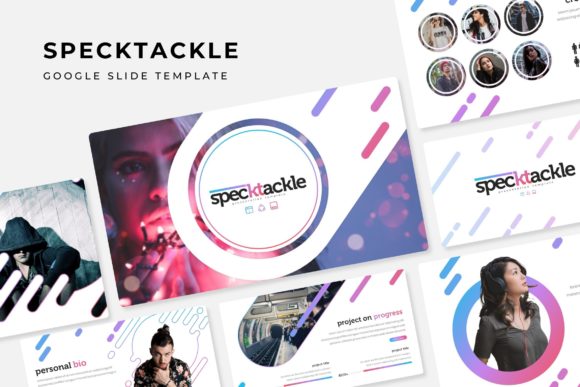
Imagine you're preparing a pitch for a new client, or perhaps outlining a complex quarterly report. You open your presentation software, and the blank, white slide stares back at you, devoid of inspiration. We have all been there—spending the first hour simply trying to establish a color palette or fix alignment issues rather than focusing on the actual content. The Specktackle Google Slide Template is designed to eliminate that friction entirely. It isn't just a collection of static layouts; it is a robust design ecosystem built for professionals who value visual consistency and efficiency. With a structure based on master slides and pixel-perfect illustrations, this asset transforms the way we approach digital storytelling, ensuring that every slide looks as polished as the idea it represents.
A Deep Dive into the Architecture
What sets this package apart from the thousands of generic templates available online is the sheer volume and versatility of the content included. The Specktackle Google Slide Template boasts over 150 total slides, but the real genius lies in how they are organized. The package comes with five premade color variations, offering 30 distinct slides for each template color. This approach allows you to match the presentation to specific brand guidelines or mood boards instantly without needing to manually adjust RGB codes or gradient stops.
The foundation of the system is its adherence to professional design standards. Built on master slides, the architecture ensures that if you make a global change—such as updating a font or shifting a background color—it cascades through the entire presentation seamlessly. Furthermore, the inclusion of widescreen PPTX files ensures compatibility across different platforms and display setups. Whether you are presenting on a massive projector screen or sharing a view-only link with a remote team, the aspect ratio and resolution remain sharp and professional.
Visual Communication and Infographics
Data presentation is often where many pitch decks fail. Charts can look cluttered, and icons can feel disconnected from the rest of the design. Specktackle addresses this by including handcrafted infographics that are not merely decorative but functional. These visual aids are designed to break down complex information into digestible, engaging graphics. From timeline flows to comparative data sets, the infographics are integrated into the master slide framework, meaning they are resizable and editable without losing quality.
For marketers and brand strategists, the ability to convey a message quickly is paramount. These slides help improve audience engagement by replacing walls of text with visual cues. When presenting a new marketing strategy or a product roadmap, using these curated graphics helps guide the viewer’s eye and reinforces key points. It moves the presentation from a passive reading experience to an active visual dialogue.
Practicality Meets Aesthetics
One of the most frustrating aspects of working with templates is rigidity. You find a layout you love, but your image is the wrong shape, or the text box won't expand to fit your paragraph. The Specktackle Google Slide Template solves this with its drag-and-drop picture placeholders and fully editable vector graphics. The "resize and edit" functionality is crucial here. It means a freelancer creating a portfolio deck can adjust the layout to suit vertical photography, while a corporate presenter can tweak the same layout for wide-screen event banners.
Consider the "Section Break Slides" and "Gallery and Portfolio" slides included in the set. These are essential for anyone in the creative industry—photographers, interior designers, or architects—who needs to showcase their work without the slide layout distracting from the images themselves. The clean, modern typography used in the template ensures that headers and body text complement the visuals rather than competing with them, fostering better readability and a cleaner brand identity.
Beyond the Slide Deck: Branding Applications
While the primary function of this asset is presentation, the design elements contained within the Specktackle package have broader applications for visual consistency. A cohesive presentation style is a direct extension of your brand identity. When you use a consistent color palette and layout structure across your internal reports and external pitches, you build brand recognition and trust with your stakeholders.
Small business owners and entrepreneurs can use these slides as a style guide foundation. If you are launching a new product, the way you present the features, benefits, and pricing in your deck can serve as a template for your marketing assets. The clean lines and modern aesthetic of the Specktackle design can influence how you approach social media graphics or web design, ensuring that your pitch deck matches the look and feel of your website and social channels.
Optimizing Your Workflow
Efficiency is the currency of the modern creative. The Specktackle Google Slide Template is engineered to save you time. Because the graphics are pixel-perfect and the layouts are pre-structured, you spend less time on technical formatting and more time on storytelling. The inclusion of a "Readme First" file and links to free fonts ensures that you don't waste time hunting for the typeface used in the preview images. This attention to detail is what separates a premium design asset from a basic download.
For content creators and bloggers, this template can be repurposed for various digital products. You could use the layouts to create lead magnets, such as downloadable PDF guides or e-books, by exporting the slides as images or PDFs. The versatility of the 150+ slides means you have enough variety to create multiple distinct documents without them looking like they came from the same source file.
Final Thoughts on Versatility
Ultimately, the value of a design asset lies in its adaptability. Whether you are a teacher organizing a curriculum, a startup founder seeking funding, or a designer compiling a case study, the Specktackle system provides a solid, professional foundation. It removes the technical barriers to professional presentation, allowing you to focus on what you do best—communicating your ideas. By leveraging the five premade color themes and the extensive library of infographics, you ensure that your next presentation is not just seen, but remembered.