Doveo PowerPoint: Streamline Your Next Presentation
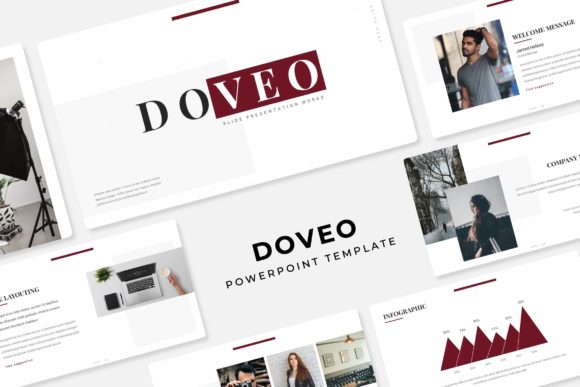
There is a specific kind of dread that sets in when you open a blank PowerPoint slide. You know the content is solid, the data is sound, and the pitch is ready, but the visual execution feels like a mountain to climb. For many professionals, designers, and entrepreneurs, the gap between a raw idea and a polished, pixel-perfect presentation is where hours disappear. This is where the value of a robust, flexible design asset becomes undeniable. The Doveo Power Point Template isn't just a collection of slides; it is a comprehensive visual system designed to bridge that gap, allowing you to focus on your message rather than wrestling with alignment boxes and color palettes.
Beyond Basic Slides: A Visual System for Brand Consistency
What sets a professional presentation apart from an amateur one is rarely the quality of the photography or the cleverness of the text—it is consistency. When you are building a brand identity, every touchpoint matters. Whether you are a small business owner pitching to investors or a marketer presenting quarterly results, your slides need to feel like they belong to the same family as your website and business cards.
The Doveo template addresses this by offering 150+ total slides built upon Master Slides. This is crucial for anyone who has ever tried to change a logo on 40 individual slides manually. By utilizing the master slide function, you ensure that global changes are applied instantly, maintaining that visual consistency which signals professionalism to your audience. It transforms the presentation from a static document into a living, breathing part of your marketing assets.
The Power of Five: Color Theory and Versatility
Color psychology plays a massive role in how your audience perceives your data. A pitch deck for a fintech startup requires a different energy than a proposal for a wedding planner. Recognizing this, Doveo provides 5 premade color variations, with 30 slides dedicated to each specific palette.
This isn't just about changing the background color; it is about a fully curated color experience. The 5 PPTX Files and 5 PPTX Widescreen options ensure that you are covered regardless of the aspect ratio your venue or platform demands. You might use the darker, high-contrast variation for a stage presentation to ensure readability from the back of the room, while utilizing a softer, lighter palette for a printed handout or a web design case study. This versatility is a massive asset for creative entrepreneurs who need to adapt their visual language for different clients or campaigns without starting from scratch.
Visual Storytelling: Infographics and Data Visualization
Data dumps are the enemy of engagement. We have all sat through presentations where the speaker reads directly off a spreadsheet. The Doveo Power Point Template combats this with handcrafted infographics and section break slides. These elements are designed to make complex information digestible and visually appealing.
For content creators and bloggers, these infographics are not just for live presentations. They can be screenshotted and repurposed for social media graphics or editorial layouts. Instead of paying a designer to create a custom chart for every blog post, you have a library of premium design assets ready to go. The inclusion of a Gallery and Portfolio slide is particularly useful for designers and agencies who need to showcase past work visually. It allows you to let your work speak for itself in a structured, elegant environment.
Workflow Efficiency: Drag, Drop, and Edit
One of the biggest friction points in design software is usability. If a template is difficult to edit, it stops being a time-saver and becomes a hindrance. Doveo focuses on workflow efficiency through features like resizable and editable graphics and picture placeholders.
The drag & drop functionality based on Master Slides means you can swap out images without worrying about distorting the layout. The pixel-perfect illustrations ensure that even if you aren't a trained graphic designer, your output looks sharp and professional. This is a game-changer for small business owners who need to update their decks frequently with new product shots or team members. You don't need to know how to use advanced clipping masks; you simply drag your image into the placeholder, and the template does the heavy lifting.
Practical Applications: From Pitch Decks to Print
While the primary function is presentations, the utility of a robust template system extends far beyond the conference room. Consider the needs of a creative entrepreneur launching a new product. You can use the Doveo template to:
- Draft the Pitch: Use the widescreen format to secure funding or partnerships.
- Create Marketing Materials: Export slides as PDFs to create print materials or digital brochures.
- Design Social Content: Use the individual slide designs as the basis for social media graphics on Instagram or LinkedIn.
- Develop Educational Content: The structured layout is perfect for creating digital products like e-books or online course materials.
Even for hobbyists or those planning events, the structure is adaptable. A poster design can be mocked up using the portfolio slides, or invitations can be designed using the typography-focused layouts. The modern typography included in the package—supported by free fonts via the included download links—ensures that your text elements look current and stylish, whether they are on a screen or printed on a flyer.
Maximizing Your Investment: Tips for Implementation
To get the most out of the Doveo Power Point Template, approach it as a starting point rather than a rigid cage. While the 150+ slides offer plenty of variety, the real magic happens when you apply your own brand assets.
Start by reviewing the Readme First file included in the package. This is often skipped, but it contains vital information regarding font installation and licensing. Ensure you download the recommended free fonts to maintain the intended aesthetic. Next, spend time selecting the color variation that best matches your specific project goals. If you are working on packaging design concepts, choose a palette that complements your physical product colors. If you are working on a web design proposal, match the hex codes to your digital brand guidelines.
Remember that audience engagement relies on clarity. Use the section break slides to give your audience a mental pause between complex topics. Use the infographics to simplify numbers. By leveraging the structure provided, you free up your cognitive load to focus on delivery and connection, which is ultimately what turns a presentation into a successful business tool.