Lumino: A Fresh Take on Presentation Design
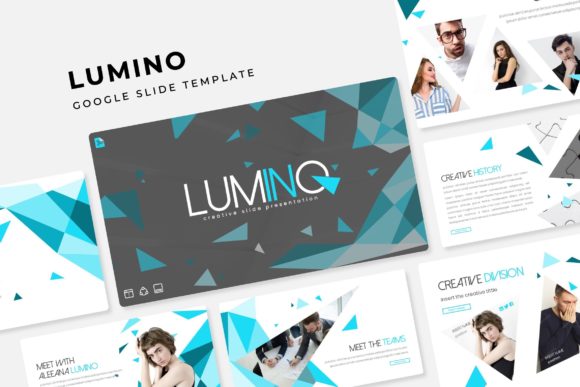
Creating a presentation that stands out often feels like a battle against time and generic templates. You open a blank slide deck, stare at the cursor, and wonder how to transform a simple idea into a compelling visual story. This is where the right design asset can change everything. The Lumino Google Slide Template isn't just another set of slides; it's a comprehensive visual system built to communicate with clarity and style. It offers a structured yet flexible foundation for anyone who needs to present ideas professionally, from startup pitches and client reports to workshop materials and portfolio showcases.
A Visual System Built for Clarity
What sets Lumino apart is its thoughtful architecture. The package includes over 150 total slides, but the organization is key. It provides five distinct, premade color themes, with 30 meticulously designed slides allocated to each theme. This isn't a random assortment of layouts; it's a cohesive language. Each color theme—whether it's a calm, professional blue, an energetic warm palette, or a sophisticated neutral tone—establishes a consistent mood from the first slide to the last. This built-in consistency is a massive advantage for brand recognition. You choose the theme that aligns with your project's personality, and every element you add will automatically feel part of a unified whole, eliminating the guesswork of color matching and style clashes.
Beyond color, the design philosophy prioritizes practicality. Every graphic, from charts to icons, is handcrafted as an infographic within the master slides. This means they aren't just pretty pictures; they are data-visualization tools designed to make complex information digestible. The inclusion of dedicated section break slides and a gallery/portfolio slide demonstrates an understanding of narrative flow. You can guide your audience through a logical progression—introduction, problem, solution, proof, call to action—using these pre-designed "chapter markers" that provide visual breathing room and reinforce structure.
From Drag-and-Drop to Pixel-Perfect Polish
The true test of a presentation template is its ease of use in real-world scenarios. Lumino is built entirely on master slides, a feature that professional designers rely on for efficiency and control. This means when you edit a font, change a color, or adjust a logo on one slide, you can propagate those changes across the entire deck with a few clicks. For a small business owner updating a sales pitch or a marketer preparing a campaign report, this saves hours of tedious, manual tweaking.
The "drag & drop" functionality is more than a buzzword here. Picture placeholders are clearly marked and resizable, allowing you to insert your own images without distorting the layout or breaking the design. You're not fighting the template; you're collaborating with it. The pixel-perfect illustrations ensure that whether you're presenting on a massive conference screen or a laptop during a video call, every line and shape appears crisp and professional. This attention to detail elevates your work, subconsciously communicating competence and care to your audience. For a freelancer or agency, using a template of this caliber for client work can significantly boost perceived value and help secure trust.
Practical Applications Across Industries
The versatility of a well-designed template like Lumino extends far beyond a standard business meeting. Consider its applications in branding and marketing. A social media manager can use the gallery slides to create a visually stunning lookbook for a new product line. An educator or workshop facilitator can build an engaging, interactive course module. A non-profit organization can craft a compelling annual report that turns dry statistics into a story of impact, using the handcrafted infographics to illustrate growth and donations.
For creative professionals, it serves as a powerful portfolio tool. A graphic designer, photographer, or architect can showcase their work on dedicated portfolio slides, using the clean layouts to let their projects speak for themselves without visual clutter. The five premade color themes even allow them to tailor the presentation's aesthetic to match the specific client or industry they are pitching to, demonstrating an acute attention to brand alignment from the very first interaction.
Entrepreneurs and content creators will find immense value in using Lumino for digital products. It can be the foundation for a paid webinar, an online course, or a premium downloadable guide. The professional finish helps justify a price point and enhances the user experience, making the content feel more valuable and trustworthy. The included font files, with free download links, ensure that typography remains consistent even if the end-user doesn't have the specific fonts installed, maintaining design integrity across different devices and users.
Making the Most of Your Design Asset
To truly harness the power of a template like Lumino, a strategic approach is beneficial. Start by selecting the color theme that best resonates with your content's emotional tone and your existing brand palette, if applicable. Don't feel constrained to use every single slide; curate the ones that serve your narrative. The section break slides are particularly useful for creating a rhythm—use them to pause, summarize a key point, or transition to a new topic.
When customizing, leverage the master slide feature. Set your brand fonts and primary colors at the master level first. This foundational step ensures global consistency and makes subsequent edits far more efficient. Use the infographic elements for what they're designed for: simplifying data. Replace placeholder text with your own key metrics and insights. The goal isn't just to make slides look good, but to make your message understood and remembered.
Finally, always review your presentation in its intended context. Check for readability on the actual screen size you'll be using. Ensure your own images are high-resolution to match the template's quality. Remember that while the template provides the visual framework, your unique content, voice, and insights are what will ultimately engage your audience. Tools like Lumino are designed to remove the friction of design, allowing you to focus on what you do best: communicating your ideas with confidence and impact.